Guide
How to Run Multiple X Accounts for Outreach
Running multiple X accounts for outreach works best with one browser profile and one static residential proxy per account, so every login keeps its own identity. Warm each account up, connect it to Xreacher, then run paced campaigns inside X's own DM caps with every reply landing in one inbox. AliasMode, the free browser profile manager the Xreacher team builds, is the free option for the profile layer: download it at aliasmode.com.
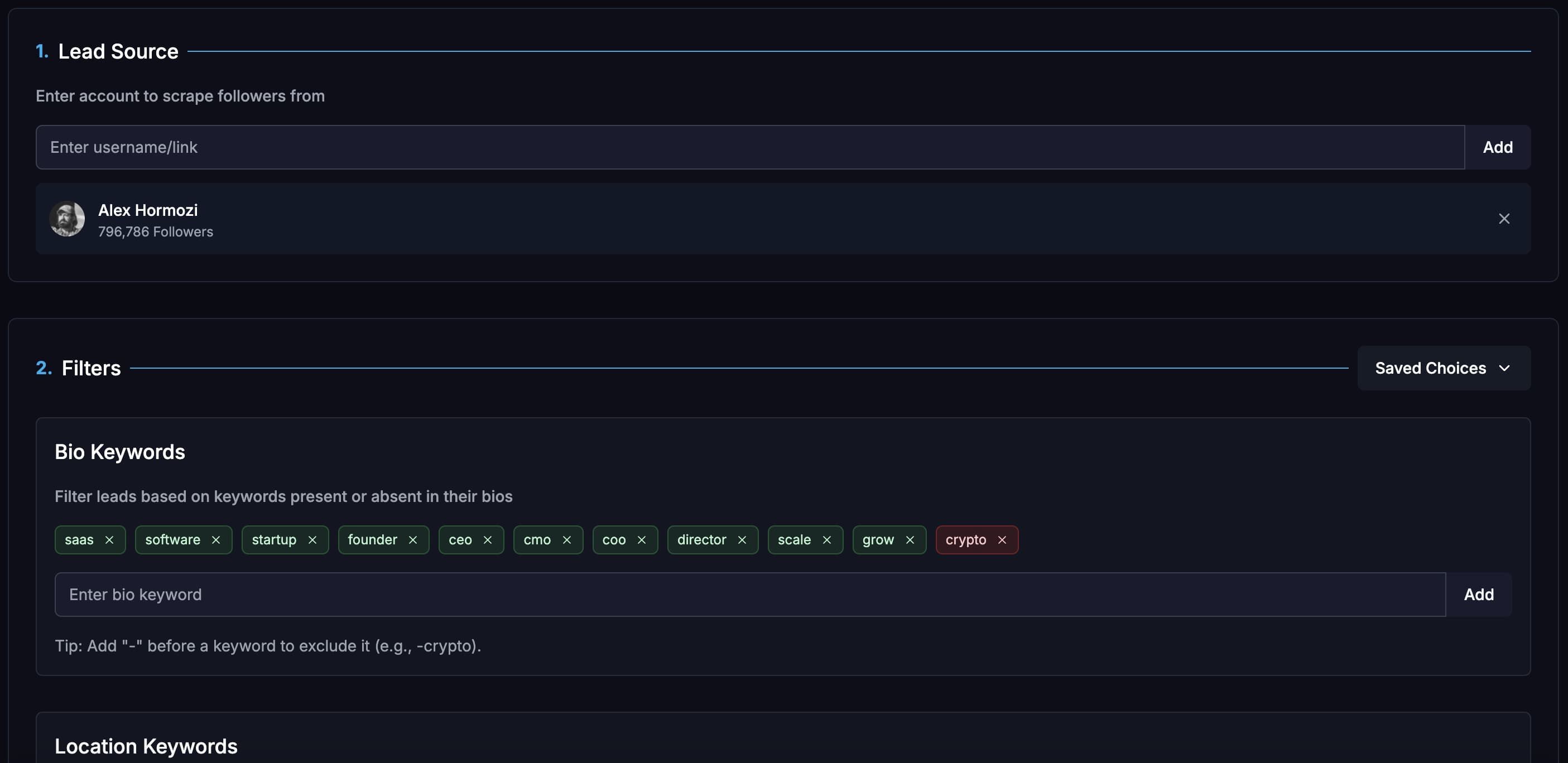
Lead sourcing built in
Build lists from X/Twitter audiences, keywords, imported lists, Telegram groups, and filtered prospect sources.
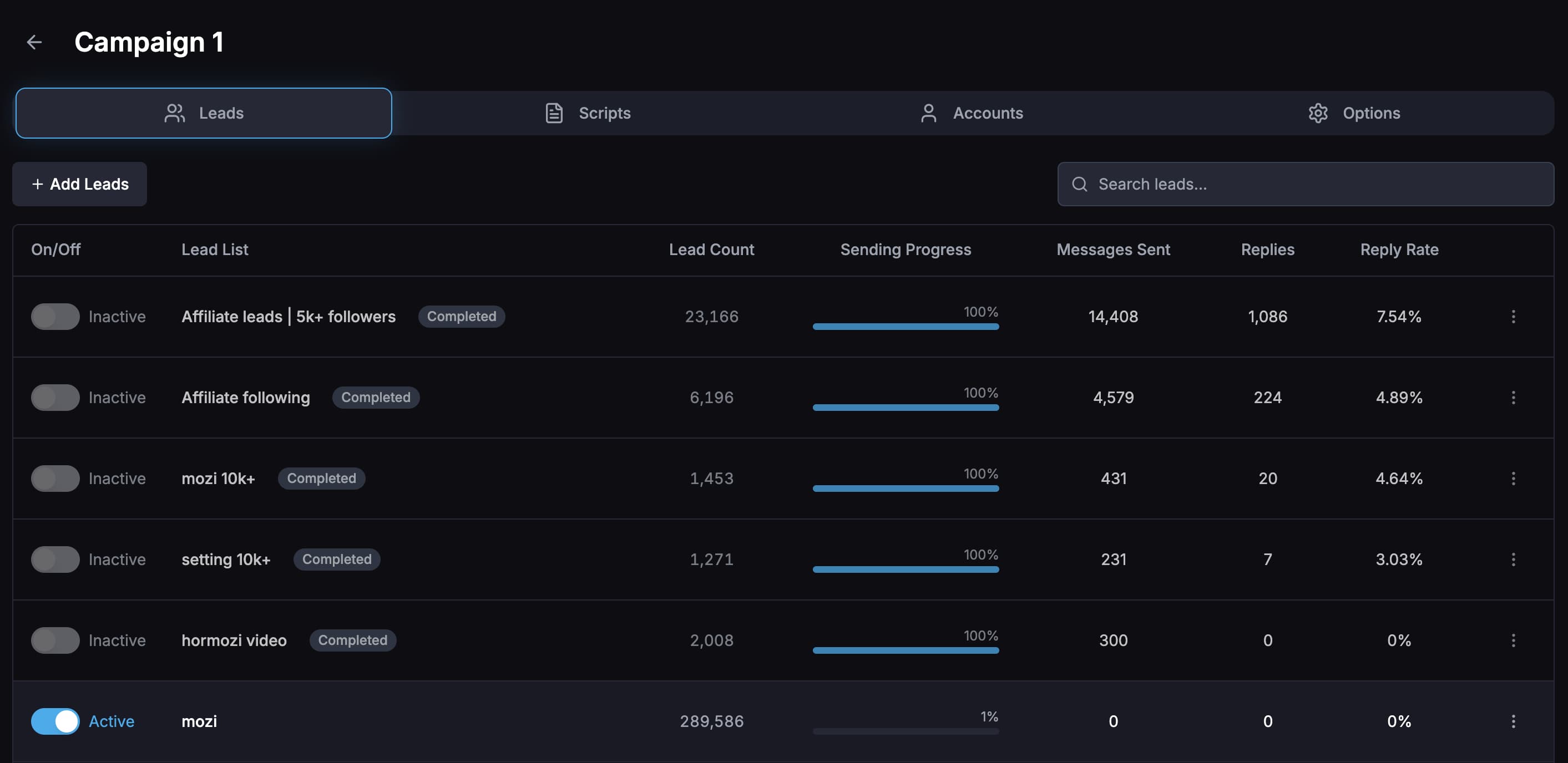
Campaign analytics
Compare reply rates by campaign, opener, message variation, sending account, and lead list so tests are not guesswork.
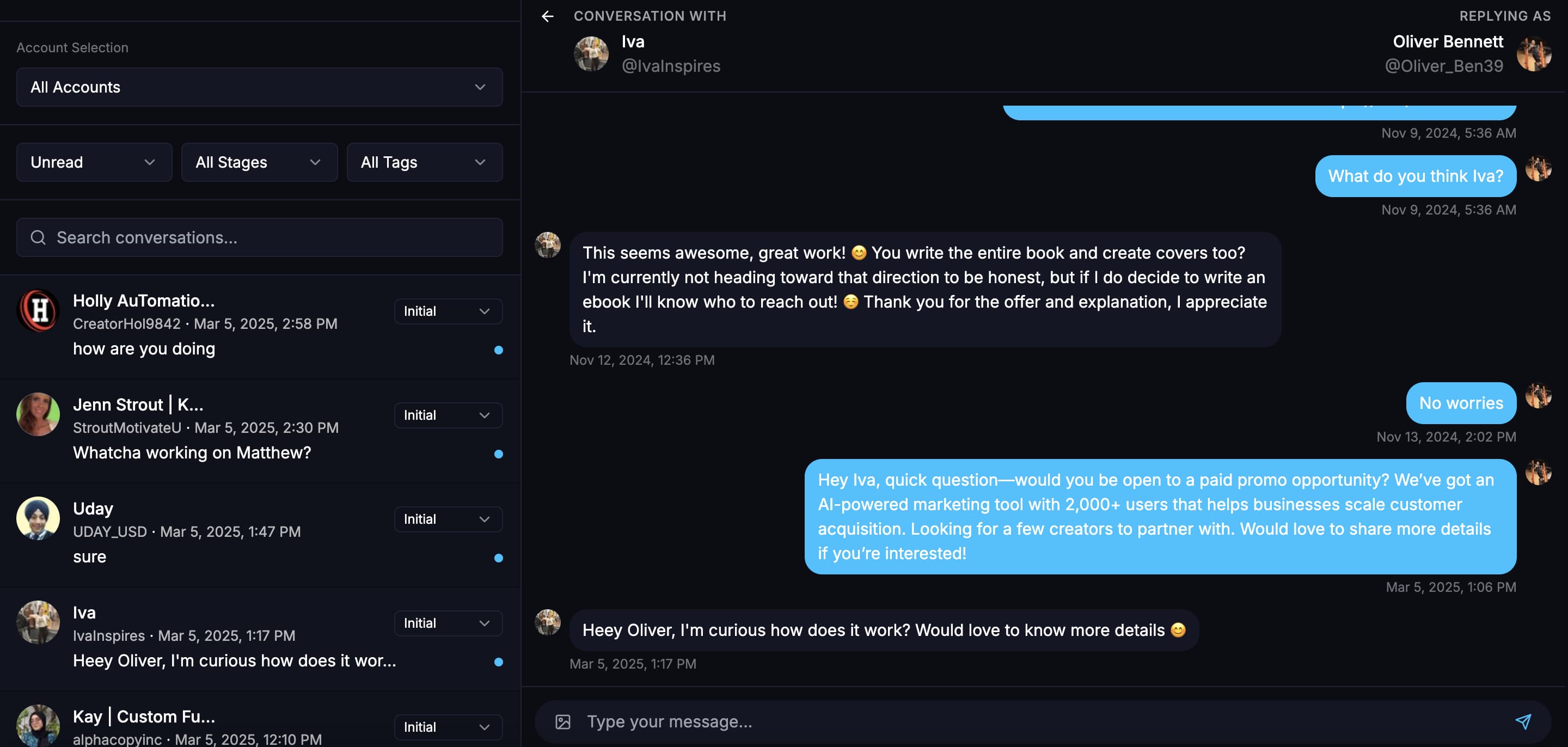
Unibox plus AI replies
Read, filter, mark, and reply to leads from one inbox, or use an AI chatbot to handle goal-based conversations.
By the numbers
What 43.7M real cold DMs say
Figures below come from the Xreacher Cold DM Benchmarks (H2 2026), computed across every X/Twitter campaign sent through Xreacher in the 180 days ending July 3, 2026, aggregated, anonymized, with the methodology published on that page.
2.2-2.5%
Solo and small senders (1-3 accounts)
Senders using 1-3 X accounts saw 2.2-2.5% reply rates, roughly 6x the 0.39% earned by mass multi-account operations. Targeting beats volume.
See the data0.39%
Mass multi-account operations (11+ accounts)
Operations on 11+ accounts generated 97.5% of all DM volume but earned only a 0.39% reply rate, about 6x below small targeted senders.
See the dataProduct proof
Screenshots from the actual outreach workflow
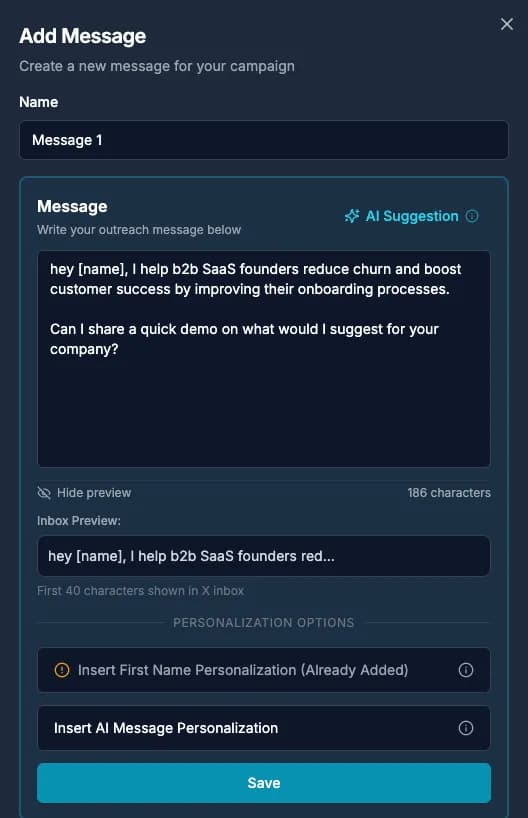
These pages are built around product workflows Xreacher already shows publicly: lead sourcing, AI-assisted messages, campaign analytics, inbox monitoring, and Telegram outreach.
Give every account its own profile and proxy
Running more than one X account from the same browser is the fastest way to get accounts linked together. Before you touch Xreacher, give every account a separate identity at the browser level. Create one browser profile per account in AliasMode, the free, open-source profile manager the Xreacher team builds and maintains, then assign that account one static residential proxy that never changes. AliasMode's desktop client is free with no profile cap, and it's a Windows beta today. Pair each profile with a fixed proxy address, not a rotating one, because a logged-in account should look like it always signs in from the same place. Write down which proxy belongs to which account so any replacement is deliberate, not accidental.
- One AliasMode browser profile per X account, free with no profile cap
- One static residential proxy per account, matched and never rotated
- Log in to each account only inside its own profile
- Keep a written account-to-proxy map for audits and replacements
Warm up before you send anything
A brand-new or freshly reconnected account should not jump straight into outreach volume. Spend the first several days on ordinary activity inside the account's own profile: browsing, following a few accounts, liking posts, the occasional reply. Xreacher tracks warmup per connected account and shows when an account is ready for normal campaign volume, so you're not guessing. Skipping this step is a common reason a new account gets rate-limited in its first week. If you're staging several accounts at once, stagger their warmup instead of starting them all the same day, so the batch's activity pattern looks organic rather than coordinated. Warmup is setup, not a one-time checkbox; keep an eye on account status even after it starts sending.
- Ordinary activity first: browsing, following, liking, occasional replies
- Xreacher tracks warmup per account and shows when it's ready
- Stagger warmup across accounts instead of launching them all together
- Recheck warmup status if an account goes quiet or gets rate-limited
Connect each account to Xreacher
Once an account is warmed up, connect it to Xreacher through the same browser profile and proxy it already warmed up in, so the login matches the identity you built. Each connected account keeps its own encrypted credentials, and its proxy assignment carries into the campaigns you run. Connect as many accounts as your plan allows, then assign them to one campaign or split them across several, depending on the account roles you planned in step one. Multiple message scripts, AI-written openers, and follow-before-DM settings apply per campaign, so different accounts can run different angles at the same time without stepping on each other.
- Connect through the same profile and proxy the account warmed up in
- Credentials are encrypted; proxy assignment carries into campaigns
- Assign accounts to one campaign or split them across several
- Run different scripts or AI openers per account or per campaign
Pace campaigns inside X's own DM caps
X sets its own daily DM limits, not Xreacher: about 7 a day on free accounts, 35 on Premium, and 75 on Premium+, as of July 2026. Xreacher's per-account daily limits and timezone-aware sending windows keep each account inside whatever cap applies to it, and an account moves into a resting state when rate-limited instead of getting pushed further. Running more accounts does not raise any single account's cap; it gives you more accounts each sending a measured amount, which is a different thing. Coordinate the campaign across accounts so the combined volume still reflects real targeting and real follow-up capacity, not just a bigger number of sends.
- X's own caps: about 7/day free, 35/day Premium, 75/day Premium+
- Per-account daily limits and sending windows enforce the cap automatically
- Rate-limited accounts rest instead of getting pushed further
- More accounts means more measured senders, not a higher per-account cap
One inbox across every account
Running several accounts multiplies the number of places a reply can land, which is what Unibox solves. Every connected account's replies flow into one real-time inbox, with lead-profile context, quick-reply templates, and media attachments, so you're not logging into five accounts to check for a response. When you want responses covered, the AI reply agent works toward a goal like booking a call, using a configurable persona and a built-in objection-handling library, and you can take over any thread yourself at any time. Analytics break reply rate down by account and by campaign, so you can see which of your accounts is actually earning replies, not just sending messages.
- All replies across every connected account land in one Unibox
- AI reply agent works a goal like booking a call, with objection handling
- Take over any conversation manually whenever you want
- Reply-rate analytics broken out by account and by campaign
What our customer data shows: more accounts is not the lever
It's tempting to treat account count as the growth lever, but Xreacher's customer data says otherwise. Senders whose own X account has 2,000 or more followers reply at about 5.4%, roughly 4.4x the customer average. Messaging people who engaged with someone else's relevant post, not the sender's own, replies at about 5.0%, roughly 4x the average. Neither number has anything to do with how many accounts are sending; both are about who gets messaged and from what kind of account. Source: Xreacher customer data, 2.1M X DM threads from 360 users, March to September 2026; correlational. Use the extra accounts this tutorial sets up to reach tighter, better-targeted lists in parallel, not to blast one generic list wider.
- Senders with 2k+ followers: about 4.4x the average reply rate
- Messaging engagers of others' posts: about 4x the average
- More accounts should mean more targeting, not more volume per list
FAQs
How do I run multiple Twitter accounts for outreach?
Give each account its own AliasMode browser profile and its own static residential proxy, log in only inside that profile, then warm the account up before sending. Once it's ready, connect it to Xreacher and run outreach inside X's daily DM caps. The setup is the same whether you're running two accounts or twenty: one profile, one proxy, one measured pace per account.
What's the best way to manage multiple X accounts without getting them linked together?
Keep every account inside its own browser profile with its own proxy, never shared. AliasMode is free and keeps profiles on your computer; a shared browser or a shared IP address is what usually links accounts together. Warm each account up separately, and keep a written map of which proxy belongs to which account so nothing gets mixed up.
Do I actually need multiple Twitter accounts for outreach to work?
Not necessarily. Xreacher's customer data shows targeting, not account count, drives replies: senders with 2k+ followers on their own account and senders messaging post engagers both reply around 4x the average, regardless of how many accounts they run. More accounts help you cover more well-targeted lists in parallel; they don't raise any single list's reply rate on their own.
Do I need one proxy per account on Twitter/X?
Yes, for any account you plan to keep. A dedicated static residential proxy per profile keeps that account's network location fixed, which is what a logged-in account needs over weeks of use. A shared or rotating address changes the account's apparent location underneath it, which makes problems hard to diagnose and easy to cause.
How long should I warm up a new X account before outreach?
Long enough that its activity looks gradual, not scripted; there's no fixed universal number. Spend the first several days on ordinary browsing, following, and liking inside the account's own profile before any campaign volume. Xreacher tracks warmup per connected account and shows when it's ready for normal sending, so you can check status instead of guessing.
Does running more X accounts get more replies?
Not by itself. Xreacher's customer data shows senders with 2k+ followers on their own account and senders messaging post engagers both reply around 4x the average, and neither factor is about account count. More accounts add sending capacity within X's own DM caps; targeting and audience quality decide whether those sends get replies.
Last updated 2026-09-24