X CRM
Twitter CRM for X DM Conversations and Leads
A Twitter CRM keeps your X DM leads and conversations in one place. Xreacher is X outreach software with a CRM-style layer: a Unibox that pulls every conversation from every connected account into one inbox, lead-profile context next to each thread, campaigns and lead lists to organize prospects, and analytics that show which lists and messages are working. It has no deal stages, so teams that need a full sales pipeline keep their CRM and use Xreacher for the X conversation.
Lead sourcing built in
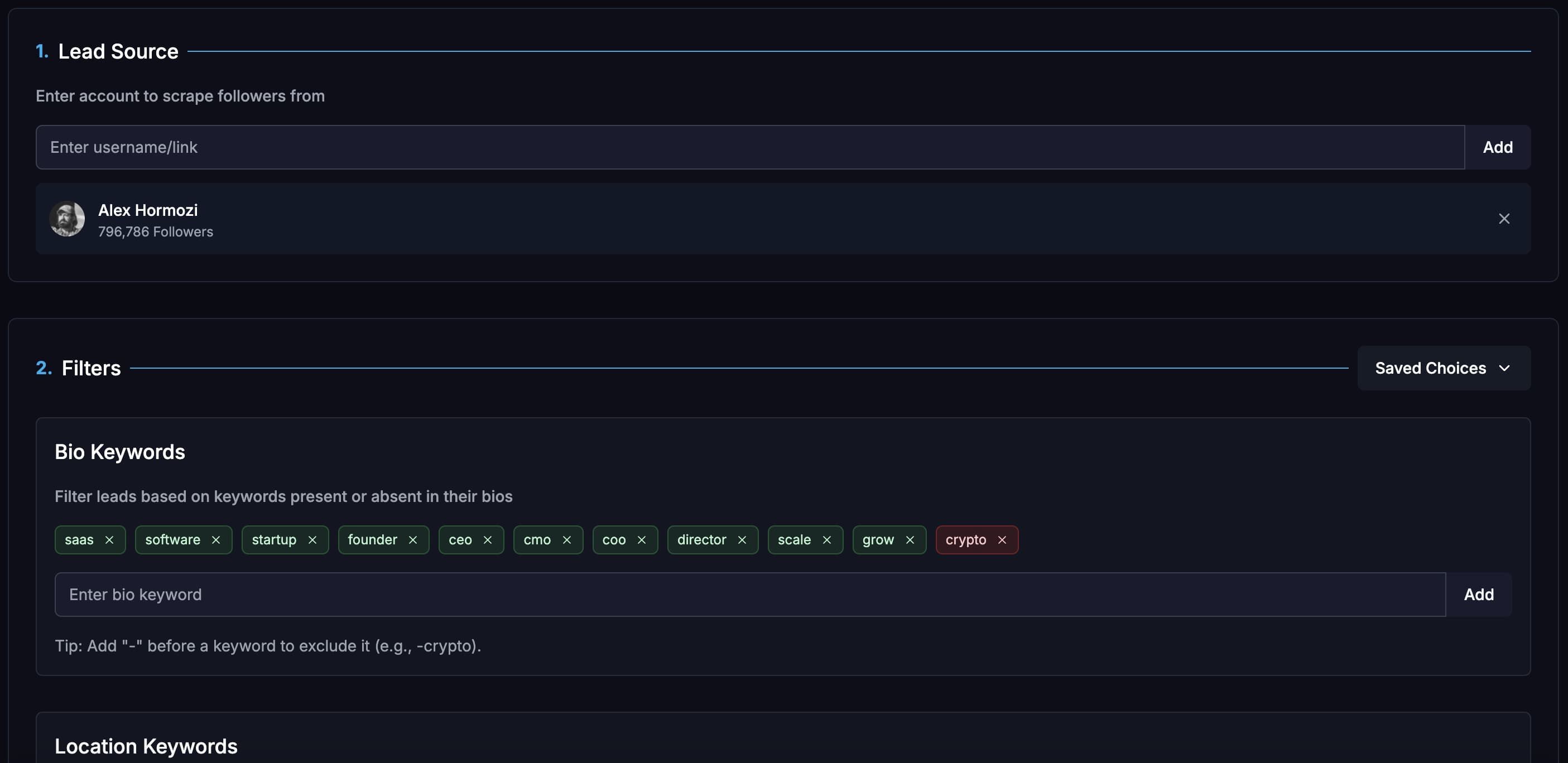
Build lists from X/Twitter audiences, keywords, imported lists, Telegram groups, and filtered prospect sources.
Campaign analytics
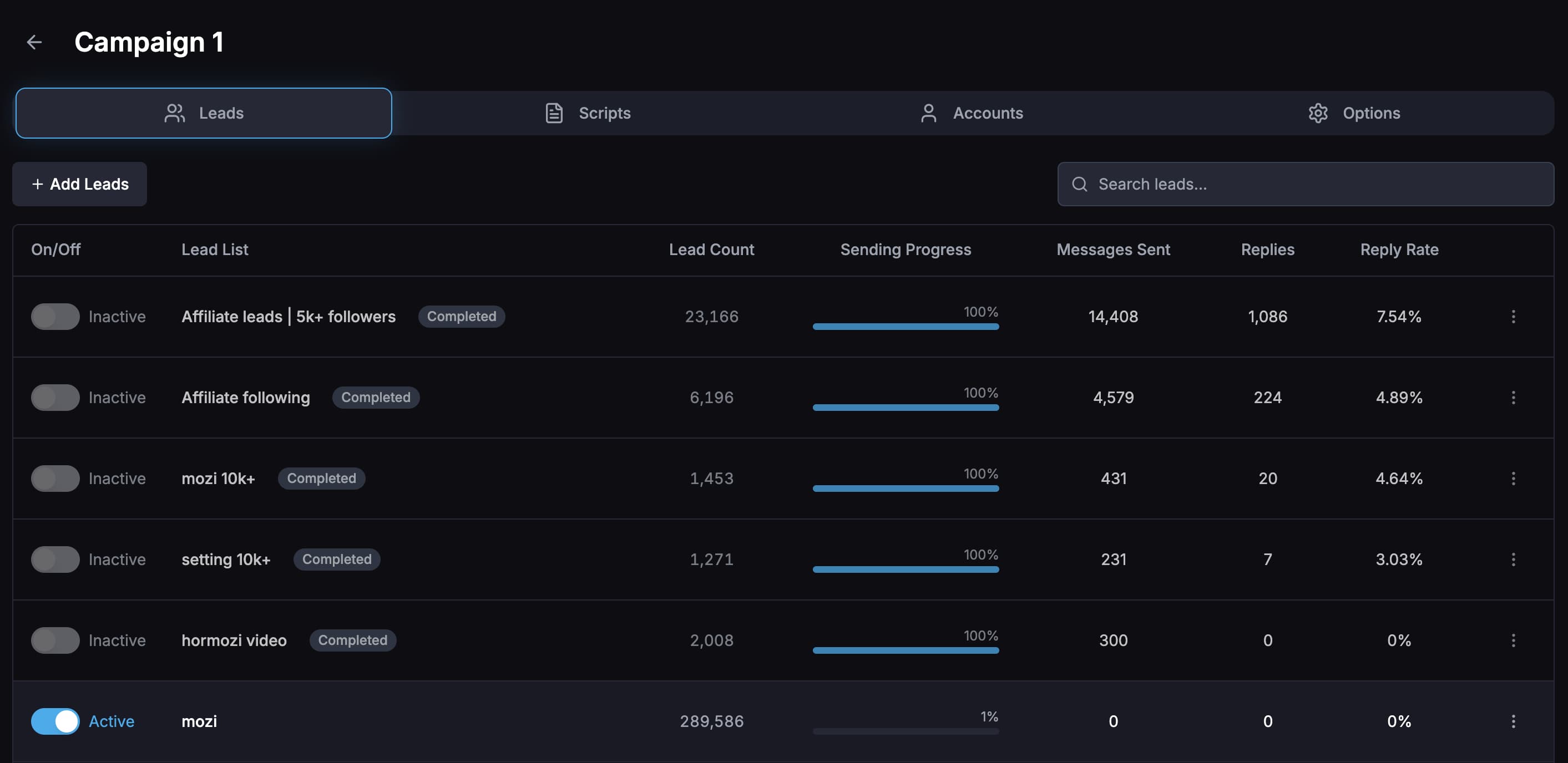
Compare reply rates by campaign, opener, message variation, sending account, and lead list so tests are not guesswork.
Unibox plus AI replies
Read, filter, mark, and reply to leads from one inbox, or use an AI chatbot to handle goal-based conversations.
By the numbers
What 43.7M real cold DMs say
Figures below come from the Xreacher Cold DM Benchmarks (H2 2026), computed across every X/Twitter campaign sent through Xreacher in the 180 days ending July 3, 2026, aggregated, anonymized, with the methodology published on that page.
42%
Replies arriving within 24 hours
42% of replies to a single-message cold DM arrive within 24 hours, 62% within three days, and 22.6% only after a full week, long after most senders stop watching the thread.
See the data99.3%
Cold DM threads that never get a follow-up
99.3% of cold DM threads are a single message; even among smaller non-bulk senders, 96.5% never send a follow-up, partly rational, since follow-ups consume the same daily DM allowance as fresh prospects.
See the dataProduct proof
Screenshots from the actual outreach workflow
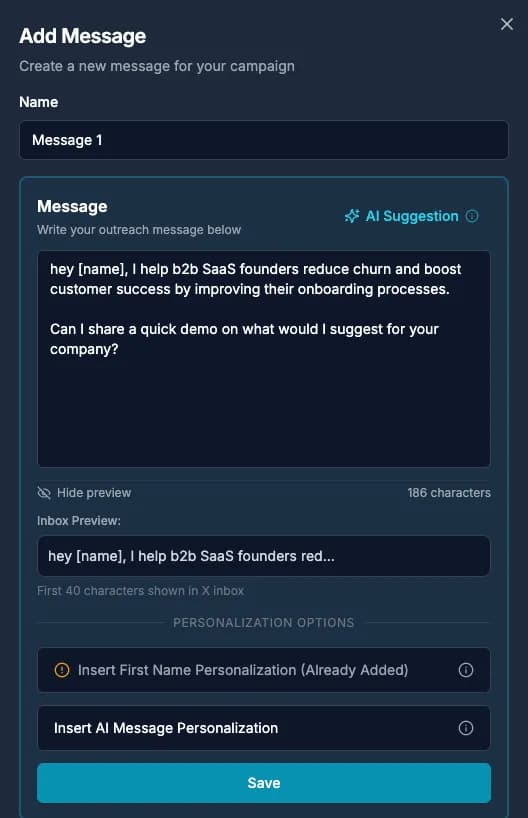
These pages are built around product workflows Xreacher already shows publicly: lead sourcing, AI-assisted messages, campaign analytics, inbox monitoring, and Telegram outreach.
One inbox for every X DM conversation
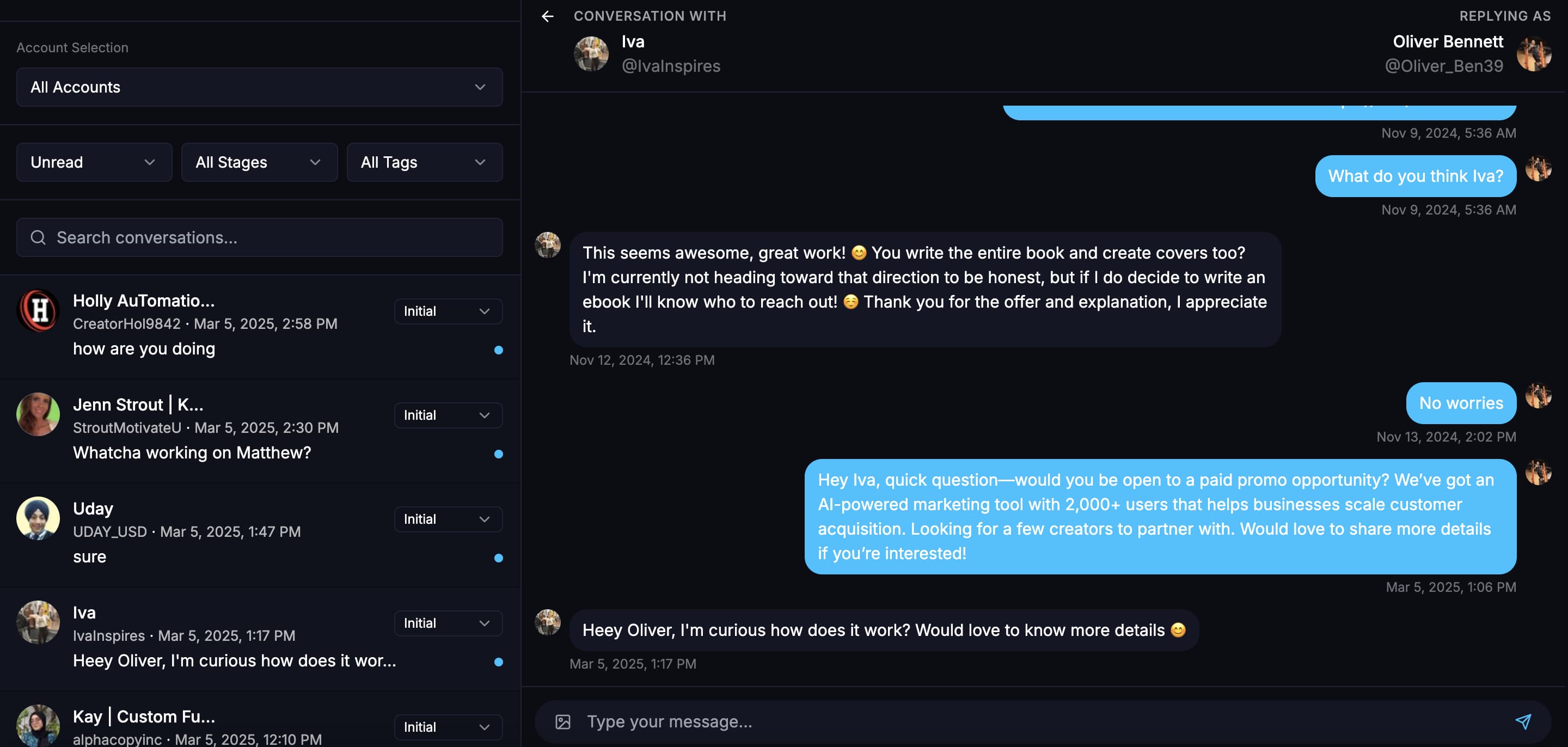
Native X DMs put every account in its own tab, so managing leads across three or five accounts means three or five separate inboxes. Xreacher's Unibox pulls every conversation from every connected account into one real-time feed. You filter and search across accounts instead of switching tabs, use quick-reply templates for questions that come up constantly, and see media attachments inline. It is the closest thing to a shared team inbox X itself does not give you, and it is where the CRM-style layer starts.
- Unibox merges DMs from every connected account into one feed
- Filter and search across accounts instead of tab-switching in native X DMs
- Quick-reply templates for repeated questions
- Media attachments and filtering handled inline
Lead-profile context next to every thread
When a reply comes in, you do not want to leave the inbox to remember who this person is. Xreacher shows lead-profile context alongside each thread, so you see who you are talking to before you answer. Because every lead came from a list you built with filters like bio keywords, verified-only, a follower range, or a location, you already know why they are in your pipeline. It is a lighter version of a CRM contact record, built from your sourcing work rather than typed in by hand.
- Profile context next to each conversation
- Leads arrive pre-qualified by your list filters
- Reply analytics per list and opener show what brought them in
- No manual data entry required
Organize leads into lists and campaigns, not one pile
Instead of custom fields and tags, Xreacher organizes leads the way outreach actually runs: into lead lists by source (scraped followers or following, tweet engagers, your own inbound followers or post engagers, CSV imports) and into campaigns that target one list with its own message scripts and AI openers. Suppression and a blocklist stop the same lead from being messaged twice across campaigns. This is the segmentation layer, and it is deliberately simpler than a full CRM's freeform tagging.
- Separate lead lists by source: scraped, followers, post engagers, CSV
- Each campaign targets one list with its own scripts and AI openers
- Suppression and blocklist prevent double-messaging a lead
- Analytics broken out per lead list show which source is converting
Reply tracking and follow-ups without a spreadsheet
Cold DM replies do not all land the same day, and most senders stop watching a thread after the first message. Xreacher runs automated follow-up sequences on a delay, automatically suppresses leads who already replied or were already messaged, and reports reply rate by campaign, opener, sending account, and lead list. That reporting is what tells you which list and which angle is actually producing conversations, instead of one blended number that hides what is working.
- Automated follow-up sequences on a configurable delay
- Leads who already replied are suppressed automatically
- Blocklist for permanent exclusions
- Reply-rate reporting by campaign, opener, account, and lead list
An AI agent to keep conversations moving
You will not read every reply the moment it lands, especially across several accounts. The AI reply agent works threads toward a goal you set, like booking a call or qualifying interest, using a persona you configure and a built-in objection-handling library for the usual pushback: not interested, why should I pay, is this safe, and bot-suspected replies. It runs from the same Unibox as your manual replies, and you can take over any thread yourself at any point.
- Configurable persona and goal, such as booking a call or qualifying interest
- Built-in objection handling for not-interested, why-pay, safety, and bot-suspected replies
- Runs across every connected account from the same Unibox
- You can take over any thread manually at any time
Where Xreacher stops being a CRM
Be clear-eyed about what this is not. Xreacher has no deal pipelines or stages, no custom fields, and no contact records beyond the lead-profile snapshot built from your scrape and filters. It does not sync to HubSpot, Salesforce, or any other CRM. What it does well is the X conversation itself: sourcing leads, sending and personalizing DMs, tracking replies, and reporting what converts. Teams running a full sales cycle typically keep their real CRM for deals and use Xreacher as the channel that feeds it.
- No deal stages or sales pipeline
- No custom fields or contact records beyond the lead-profile snapshot
- No native CRM integrations or syncing
- Best paired with a spreadsheet or your existing CRM for deal tracking
FAQs
Is Xreacher a CRM for Twitter?
Not a traditional one. Xreacher does not have deal stages, custom fields, or CRM integrations. What it has is a CRM-style layer built for X DMs: one inbox across accounts, lead context on every thread, lead lists, follow-up tracking, and reply analytics. Think of it as the conversation layer, not a replacement for a full sales CRM.
Can I manage Twitter DMs from multiple accounts in one inbox?
Yes. The Unibox pulls DMs from every connected X account into one real-time inbox, so you are not switching between separate native DM tabs per account. You get quick-reply templates, lead-profile context, media attachments, and filtering, all in the same view regardless of which account a conversation is happening on.
Does Xreacher track replies and follow-ups automatically?
Yes. Automated follow-up sequences run on a delay, and leads who already replied or were already messaged are suppressed automatically so you do not double-send. Analytics report reply rate by campaign, opener, account, and lead list, which shows you what is actually converting instead of one blended number.
Can I organize my X leads into lists like a CRM?
Yes, by lead list and campaign rather than by tags or custom fields. Build separate lists from scraped followers or following, tweet engagers, your own inbound followers or post engagers, and CSV imports, then run a campaign against each list with its own message scripts and AI openers.
Does Xreacher integrate with HubSpot, Salesforce, or my CRM?
No, Xreacher does not sync to HubSpot, Salesforce, or other CRMs, and it has no deal pipeline or custom fields. If you need a full sales pipeline, keep your existing CRM for deals and use Xreacher for the X conversation layer: sourcing leads, DMing, follow-ups, and reply tracking.
How much does a Twitter CRM cost?
Pro starts at $67/month for one account, with a 7-day free trial (card required), and includes the Unibox and AI reply agent. A Scale plan prices per account with volume discounts for teams running many sending accounts. See the pricing page for current tiers.
Last updated 2026-09-24