Pricing guide

LinkedIn Sales Navigator Pricing in 2026: Core, Advanced and Advanced Plus

LinkedIn Sales Navigator has three plans. Core costs $119.99 a month, or $89.99 a month billed yearly ($1,079.88 a year).

Used by people at

SavillsTai LopezWhopMEXCBitMart3CommasCornellEvil MartiansTavusBrowserbaseRecraftSalesforgeDebutifyZealySushiCrunchDAOSully.aiSlashyContent at ScaleLifesight

In short

Advanced costs $159.99 a month, or $149.99 a month billed yearly ($1,799.88 a year). Advanced Plus has no public price: LinkedIn quotes it per team. These are US list prices per seat before tax, as of November 2026. Every plan includes 50 InMail credits a month and up to 10,000 saved leads, and Advanced adds team features such as TeamLink and Smart Links. No plan lets you export leads to a CSV, so most teams also pay for tools to get the leads out and contact them.

Sales Navigator plans and prices

LinkedIn sells Sales Navigator per seat, billed monthly or yearly. Yearly billing saves 25% on Core but only about 6% on Advanced, so the gap between the two plans is much bigger on a yearly contract.

Read more

The prices below are LinkedIn's US list prices before tax as of November 2026; other countries pay in their own currency at different rates, and the checkout page shows your price.

  • Core: $119.99 a month, or $1,079.88 a year ($89.99 a month)
  • Advanced: $159.99 a month, or $1,799.88 a year ($149.99 a month)
  • Advanced Plus: custom quote from LinkedIn's sales team
  • All prices are per seat; each person on the team needs one

What each plan includes

Core is built for one seller: the advanced lead and account search, saved leads and lists, lead recommendations and alerts, and InMail.

Read more

Advanced adds what a sales team shares: TeamLink, which shows who on your team knows a prospect, Smart Links to track who opens your content, buyer intent signals, shared lists and saved searches, account uploads from a CSV and usage reporting. Advanced Plus is for companies that want Sales Navigator to sync with Salesforce, HubSpot or Microsoft Dynamics.

  • Core: advanced search filters, 10,000 saved leads, custom lists, alerts, 50 InMails a month
  • Advanced: everything in Core plus TeamLink, Smart Links, buyer intent, shared lists, account CSV upload, reporting
  • Advanced Plus: everything in Advanced plus CRM sync, on a quote

InMail credits and the other limits

Every plan gets 50 InMail credits a month per seat. Unused credits roll over up to a balance of 150, and LinkedIn gives a credit back for an InMail answered within 90 days.

Read more

A search shows at most 2,500 results, and you can save up to 10,000 leads. Sales Navigator comes with no higher published limit on connection requests: invitations still count toward LinkedIn's weekly invitation limit, so a bigger search does not mean more people reached each week.

  • 50 InMail credits a month per seat, rolling over up to 150
  • Credits back for InMails answered within 90 days
  • Up to 2,500 results per search and 10,000 saved leads
  • Connection requests still count toward LinkedIn's weekly invitation limit

What a team really pays

For one seller, Core billed yearly is the cheapest way in at $1,079.88 a year. Teams usually need Advanced for shared lists and TeamLink, and that adds up quickly: 5 seats of Advanced billed yearly come to $8,999.40, and 10 seats to $17,998.80.

Read more

On top of that, most teams pay for a way to get leads out of Sales Navigator, an email finder, and an automation tool to send connection requests and follow-ups. Count all of it when you decide whether the seat is worth it.

  • 1 seat, Core, yearly: $1,079.88
  • 5 seats, Advanced, yearly: $8,999.40
  • 10 seats, Advanced, yearly: $17,998.80
  • Plus export, email finding and outreach tools

Is Sales Navigator worth it?

Sales Navigator pays for itself when you sell to named accounts and work them by hand: you save accounts, watch for job changes and news, use TeamLink for warm introductions and send InMails to people outside your network.

Read more

It is harder to justify when what you need is a list of people by job title, industry, location and company size to run connection-request campaigns. The search is the main thing you use then, and the seat does nothing to send, follow up or track replies.

  • Worth it: account-based selling, warm intros, InMail to people outside your network, CRM sync
  • Less worth it: building lists by title and company size for connection campaigns

Cheaper ways to get the same leads

Xreacher has a LinkedIn lead database with Sales Navigator-style filters: job title, function, seniority, years of experience, industries, company headcount and skills.

Read more

Describe your audience in a sentence and get matching profiles in about 30 seconds; nothing is scraped from your own LinkedIn account to build the list. You can also paste a standard LinkedIn people-search link, or upload a CSV of leads you exported from Sales Navigator with another tool. Then the same list runs a LinkedIn campaign: connection requests with rotating notes, messages after acceptance and follow-ups, with verified emails found at 1 credit each and nothing charged when no email is found.

  • LinkedIn lead database with Sales Navigator-style filters
  • A people-search link or a CSV upload also works
  • Connection requests, messages after acceptance and follow-ups in one campaign
  • Verified emails: pay only when the mail server confirms it
  • Turn any LinkedIn list into a LinkedIn and X campaign in one click
Sales Navigator vs Xreacher on price

Xreacher Pro costs $67 a month for 1 seat, $135 for 5 and $189 for 10, and each seat covers 1 LinkedIn, 1 X and 1 Telegram account, with lead search included in the plan and a 7-day free trial.

Read more

One Sales Navigator Core seat costs $119.99 a month before any outreach tool. The two also work together. If you already pay for a seat, paste a Sales Navigator search or lead list into Xreacher (up to about 2,500 people per search) and send connection requests, follow-ups and InMails from that account in one sequence, for example an InMail to everyone who ignores the request. InMails to open profiles use no credits, and every reply lands in one inbox.

  • Sales Navigator Core: $119.99 a month per seat, search and InMail
  • Xreacher Pro: $67 a month for 1 seat, search plus LinkedIn, X and Telegram outreach
  • Xreacher Pro 10: $189 a month for 10 LinkedIn, 10 X and 10 Telegram accounts
  • Already have a seat: run your Sales Navigator searches and send InMails from Xreacher

Product proof

Screenshots from the actual outreach workflow

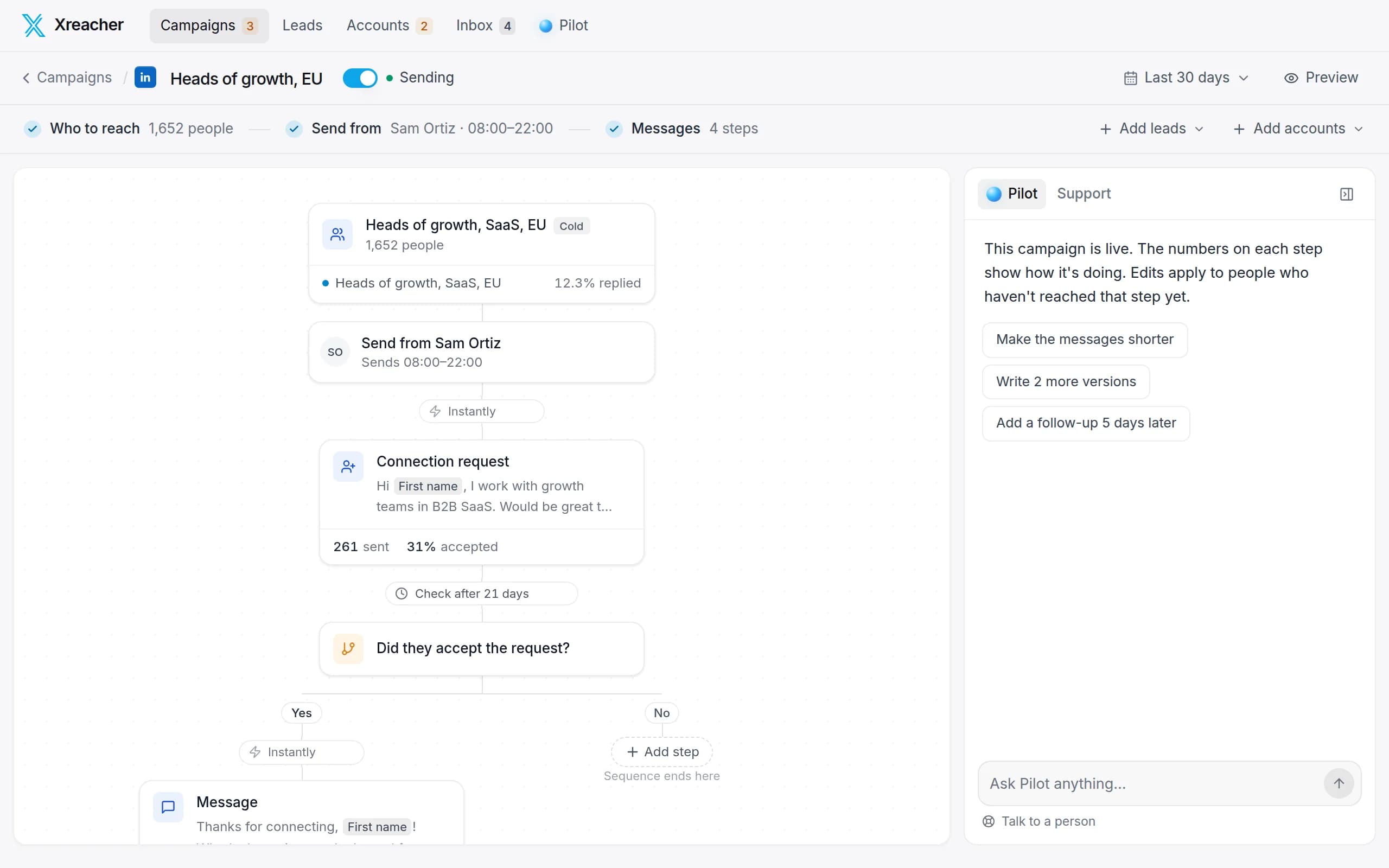
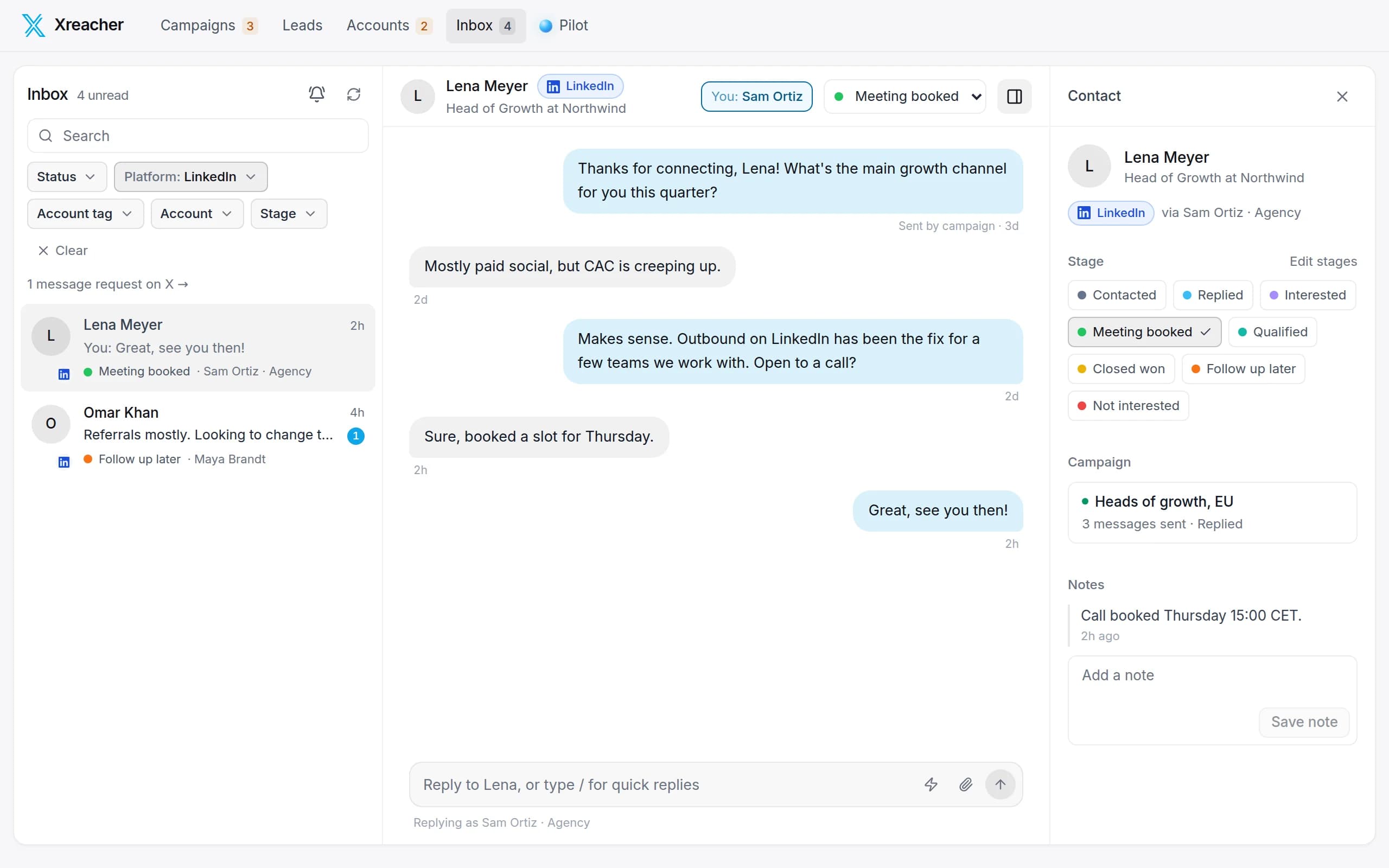
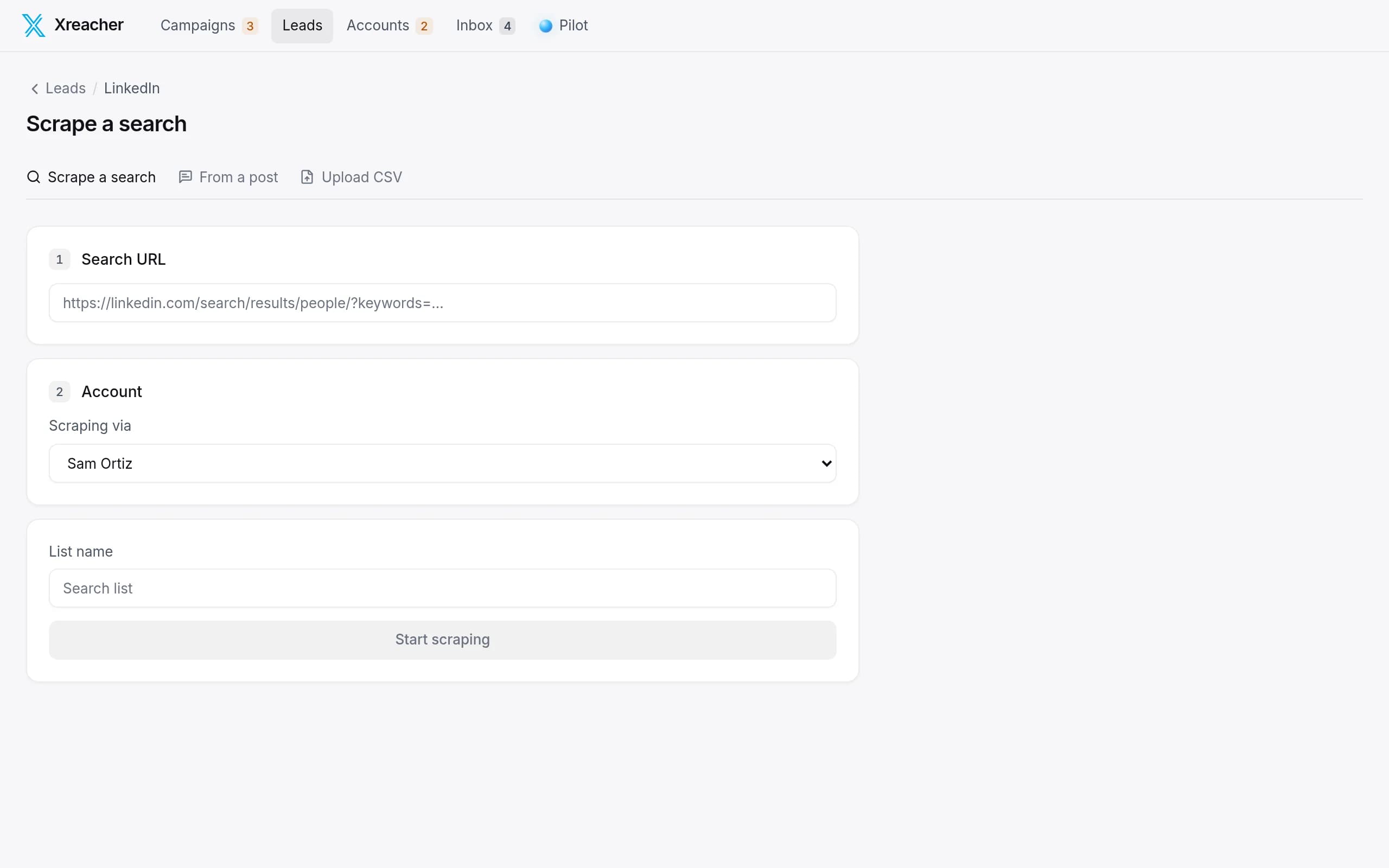
These fictional example workspaces reflect Xreacher's LinkedIn workflow: people-search lead lists, optional connection notes, accept-triggered messages, timed follow-ups, and campaign analytics.

  • People-search lead lists

    Turn LinkedIn people-search results into a campaign list, or import an existing list your team already approved.

  • Request-to-follow-up workflow

    Send requests with an optional note, then trigger the first message and timed follow-ups after acceptance.

  • Campaign analytics

    Review activity from the same LinkedIn campaign workflow.

Xreacher LinkedIn lead source turning a people search into a lead list
Build a lead list from LinkedIn people-search results or import an existing list.
Example Xreacher workspace showing a fictional LinkedIn connection note and post-accept sequence
Configure an optional connection note and messages that begin after acceptance.
Xreacher LinkedIn inbox with fictional prospect replies and pipeline stages
Answer LinkedIn replies and track every lead's stage in one inbox.

FAQ

Frequently asked questions

How much does LinkedIn Sales Navigator cost per month?

In the US, Core costs $119.99 a month and Advanced $159.99 a month on monthly billing. Billed yearly they work out to $89.99 and $149.99 a month. Advanced Plus is priced on a quote. Prices are per seat before tax, as of November 2026.

Is Sales Navigator cheaper if you pay yearly?

Yes. Yearly billing saves 25% on Core ($1,079.88 a year instead of $1,439.88) and about 6% on Advanced ($1,799.88 a year instead of $1,919.88).

What is the difference between Sales Navigator Core and Advanced?

Both have the same search filters, 10,000 saved leads and 50 InMail credits a month. Advanced adds team features: TeamLink, Smart Links, buyer intent signals, shared lists and saved searches, account CSV uploads and usage reporting.

How many InMails do you get with Sales Navigator?

50 InMail credits a month on every plan. Unused credits roll over up to 150, and you get a credit back when someone answers your InMail within 90 days.

Can you export leads from Sales Navigator?

Not to a CSV. Advanced Plus can sync with a CRM, but no plan has a lead export button, which is why many teams use a separate tool or build their lists elsewhere.

Do I need Sales Navigator for LinkedIn automation?

No. Xreacher builds LinkedIn lists from its own lead database with Sales Navigator-style filters or from a standard people-search link, and runs connection requests and follow-ups from those lists. A Sales Navigator seat is optional; if you have one, Xreacher can also use your Sales Navigator searches and send InMails from that account.

Is there a free trial of Sales Navigator?

LinkedIn offers a free trial to eligible members. Whether you qualify and how long it lasts shows on the Sales Navigator checkout page.

Join 8,000+ people already on Xreacher.

Start a free trial and launch your first campaign today, or walk through your setup with our team.

Start free trial