Xreacher Logo

X/Twitter Outreach

The Twitter outreach tool for the whole workflow

A Twitter outreach tool is software that sources X leads, sends personalized cold DMs, and manages replies in one place. Xreacher adds a deep-filter scraper, follow-before-DM, an AI reply agent that works toward booked calls, and ads-manager analytics that split-test reply rate by campaign, opener, account, and lead list.

Lead sourcing built in

Build lists from X/Twitter audiences, keywords, imported lists, Telegram groups, and filtered prospect sources.

Campaign analytics

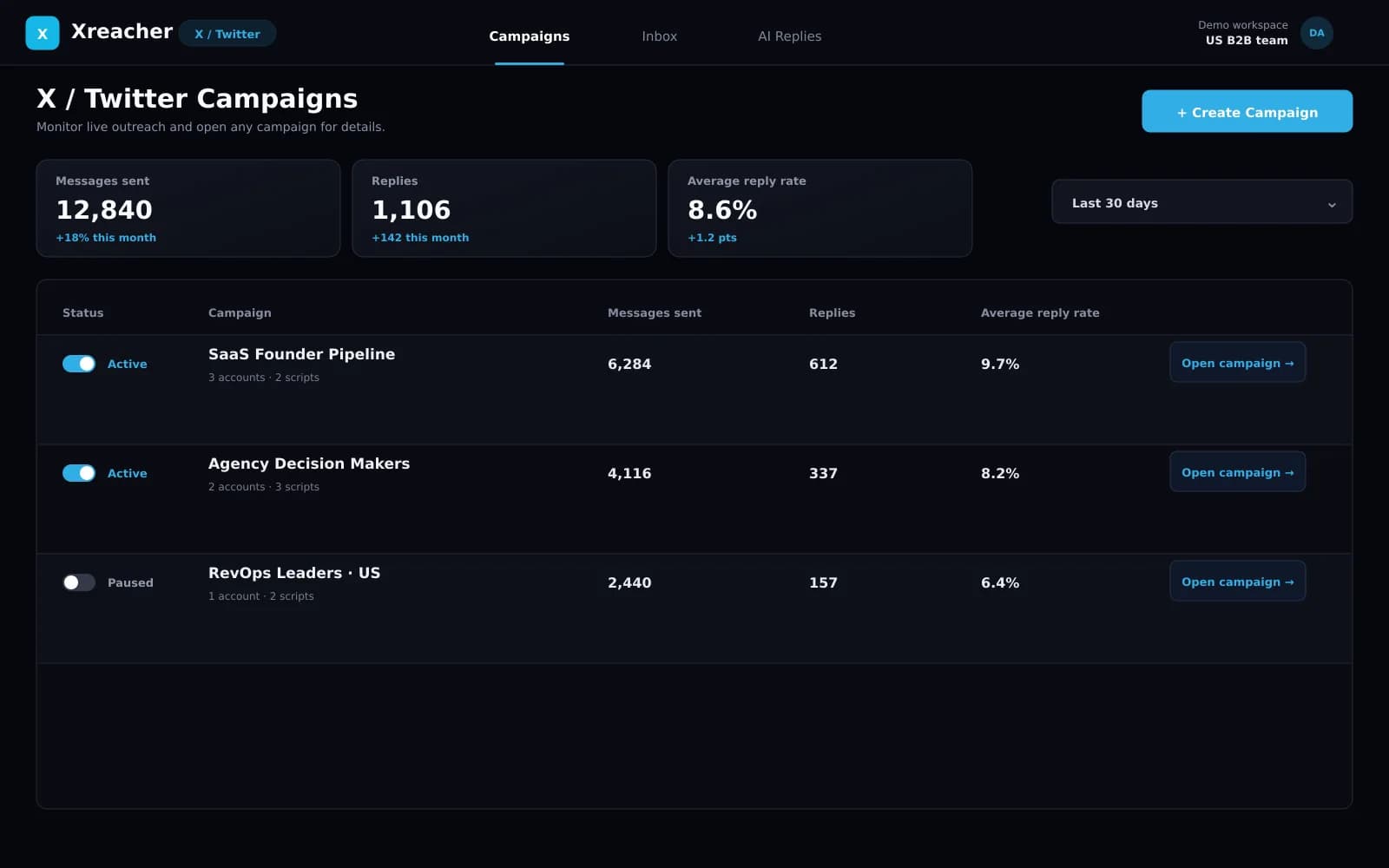
Compare reply rates by campaign, opener, message variation, sending account, and lead list so tests are not guesswork.

Unibox plus AI replies

Read, filter, mark, and reply to leads from one inbox, or use an AI chatbot to handle goal-based conversations.

Product proof

Screenshots from the actual outreach workflow

These pages are built around product workflows Xreacher already shows publicly: lead sourcing, AI-assisted messages, campaign analytics, inbox monitoring, and Telegram outreach.

Xreacher lead source setup for X/Twitter outreach
Build lead sources from X/Twitter accounts and audiences.
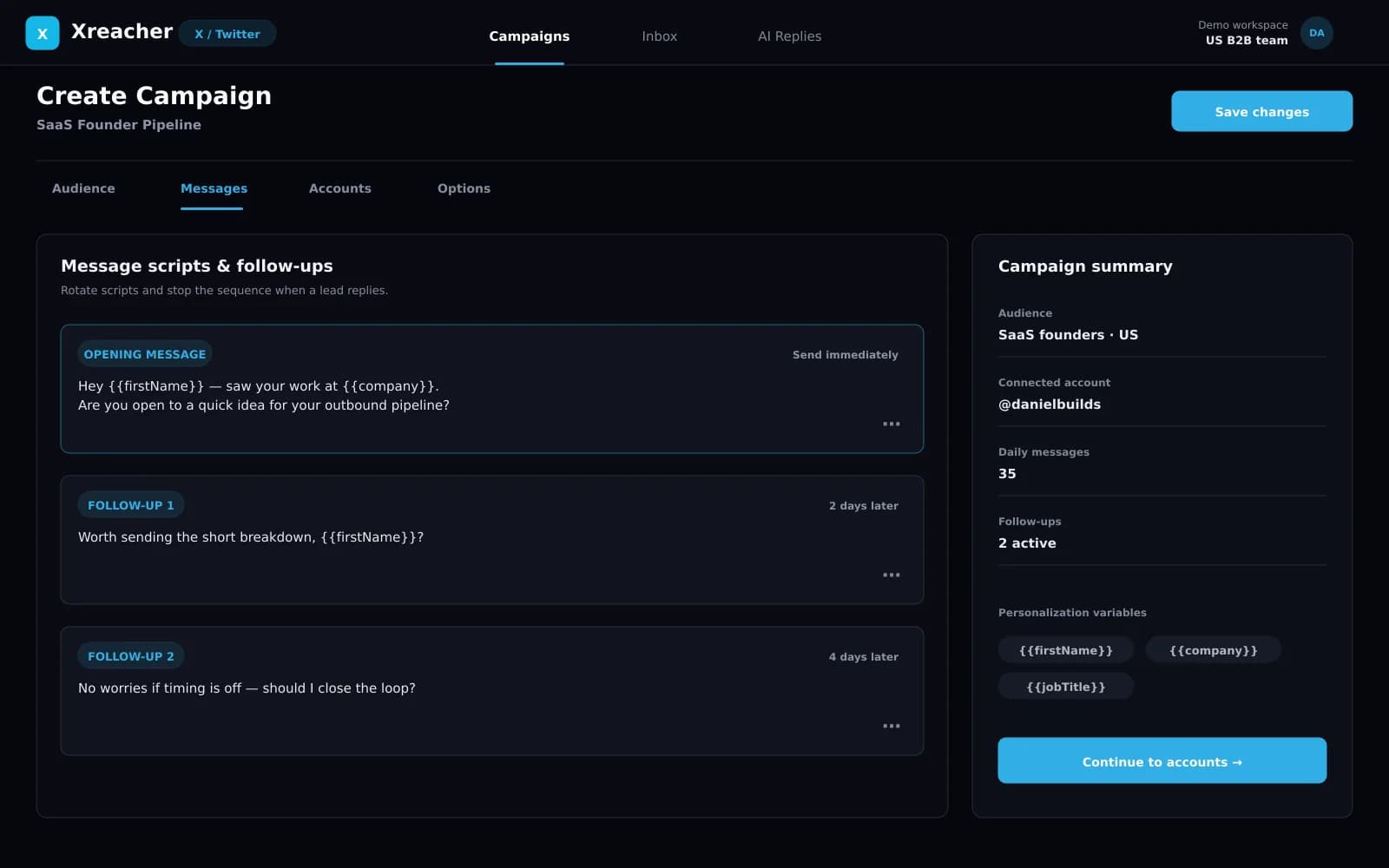
Xreacher AI message suggestions for outreach campaigns
Generate and refine cold DM scripts before launching campaigns.
Xreacher campaign analytics dashboard
Track campaign performance, replies, and script-level results.
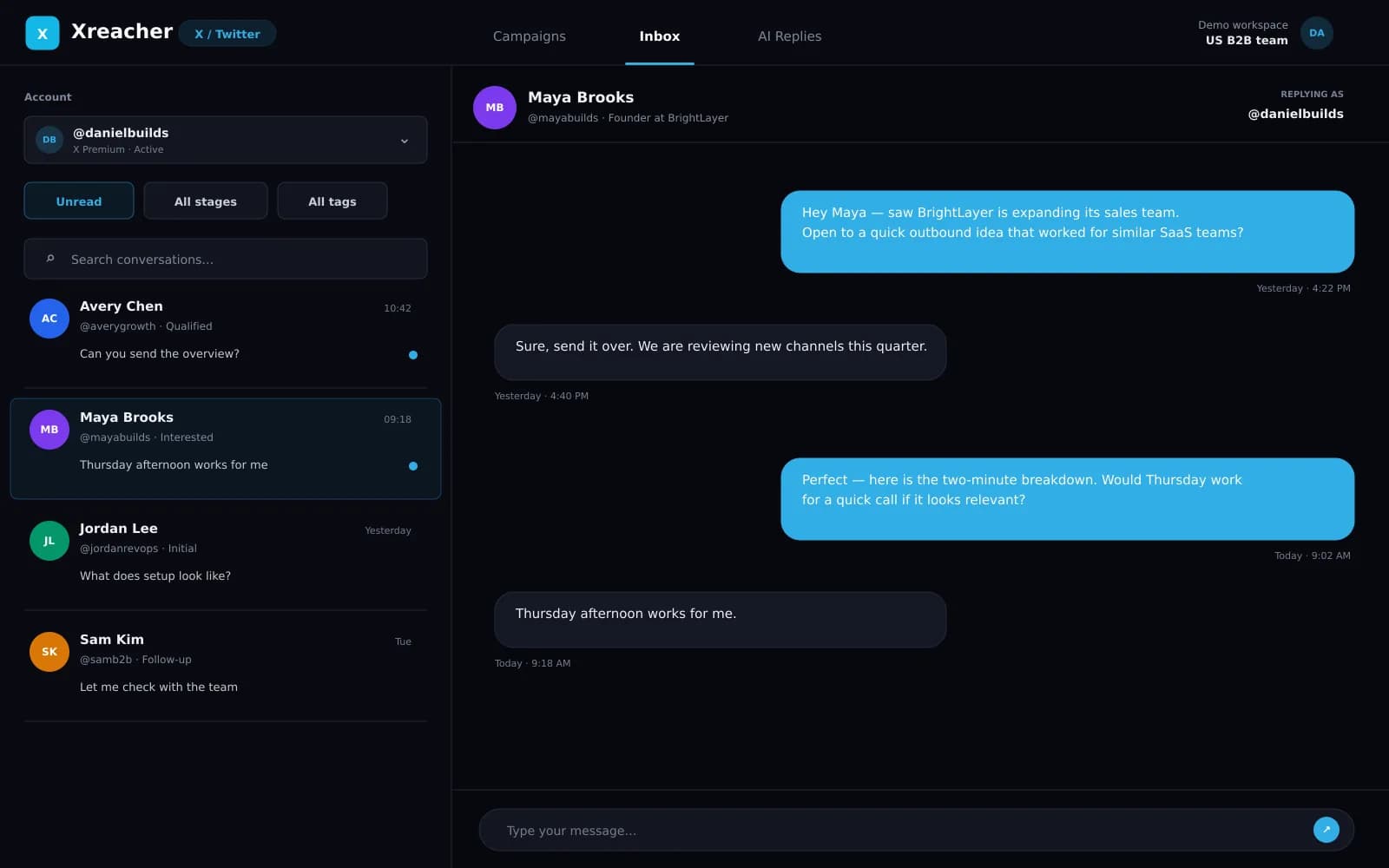
Xreacher inbox for monitoring outreach replies
Monitor replies and conversations from one workspace.

Source leads with a deep-filter X scraper

Build targeted lists from an account's followers, its following, or the people who liked, commented on, and retweeted a specific tweet. You can also import a CSV. Then narrow hard: bio keywords to include AND exclude, location exclusions, gender, min and max followers, min and max following, verified-only, has-website, and include or exclude accounts with closed DMs. The result is a list of people who actually match your offer, not a blended dump, so your openers land on the right audience. Scraping is credit-based.

  • Scrape followers, following, or tweet likers/commenters/retweeters
  • Include and exclude bio keywords plus location exclusions
  • Follower, following, verified, website, and closed-DM filters

Send personalized cold DMs that pace safely

Run campaigns with multiple message scripts and multiple connected accounts coordinated together. Set per-account daily sending limits and timezone-aware sending windows so activity stays measured. Turn on follow-before-DM and auto-follow-after-DM with a follow limit and unfollow delay, then layer automated follow-up sequences with your own delays. Xreacher skips leads you have already messaged through suppression and honors a blocklist, so you never double-tap a prospect or hit someone you meant to exclude.

  • Multiple scripts and accounts per campaign
  • Follow-before-DM plus timed auto follow-ups
  • Suppression of prior contacts and a blocklist

Handle replies in one Unibox with an AI agent

Every response from every connected account lands in a single real-time Unibox, with quick-reply templates, media attachments, lead filtering and marking, and lead-profile context next to each thread. When you cannot answer fast enough, the AI reply agent takes over and works toward a goal such as booking a call or promoting an offer. It runs a configurable persona (name, age, gender, style, language), respects scheduling and message pacing, and draws on a built-in objection-handling library for not-interested, why-pay, safety, bot-suspected, and contact-request replies.

  • Unified real-time inbox across all accounts
  • Quick-reply templates, media, and lead context
  • AI reply agent with persona and objection handling

Split-test angles with ads-manager analytics

This is where Xreacher pulls ahead. Instead of one blended reply rate, you get an ads-manager-style dashboard that breaks reply rate down by campaign, by opener and message variation, by sending account, and by lead list. That means you can see which angle, which list, and which account are actually producing conversations, then double down on the winners and cut the rest. Reply tracking from the Unibox feeds these numbers automatically, so the dashboard reflects real conversations, not just sends.

  • Reply rate by campaign, opener, account, and list
  • Compare message variations side by side
  • Reply data fed automatically from the Unibox

Scale accounts without burning them

Connect multiple X accounts, each with its own proxy, and track warmup as they ramp. Xreacher surfaces account states like rate-limited and resting/cooldown so you can pace around them instead of pushing through. Credentials are encrypted, verification is tracked, and an anti-spam and risk system runs in the background with device fingerprinting, risk scoring, spam-status tracking, and admin review. You can also provision and add X accounts in-app when you want to grow capacity.

  • Per-account proxies and warmup tracking
  • Rate-limited and resting account states surfaced
  • Anti-spam and risk monitoring with encrypted credentials

FAQs

Is Xreacher safe to use for Twitter outreach?

Xreacher is built around control, not volume. You set per-account daily sending limits and timezone-aware windows, use follow-before-DM, warm up accounts, and let resting and rate-limited states pause activity. Suppression and a blocklist stop repeat contacts, and a background risk system scores accounts for spam signals.

How does the lead scraper find the right people?

You pull leads from an account's followers, its following, or the people who liked, commented on, or retweeted a tweet, or import a CSV. Then filter by include and exclude bio keywords, location exclusions, gender, follower and following ranges, verified status, website presence, and closed-DM status.

Can the AI chatbot actually book calls?

The AI reply agent auto-responds to leads and works toward a goal you set, such as booking a call or promoting an offer. It runs current top-tier models, uses a configurable persona and pacing, and handles common objections like not-interested, why-pay, and safety questions from a built-in library.

Can I run multiple X accounts at once?

Yes. Connect multiple X accounts, give each its own proxy, and track warmup as they ramp. Campaigns coordinate sending across accounts, the Unibox unifies every reply in one place, and account states like resting and rate-limited help you pace each account safely.

What does Xreacher cost?

There is a free tier with starter limits and one account, a paid monthly single-account plan that includes the Unibox and AI chatbot, and a Scale plan priced per account where the per-account cost drops sharply at higher counts. You can pay by card via Stripe or with crypto.

Does Xreacher work for Telegram too?

Yes. The same stack runs Telegram outreach under the name Telereacher, covering group lead sourcing, segmentation, personalized messages, follow-ups, replies, analytics, and the AI chatbot. You manage X and Telegram from one workspace. LinkedIn is coming but not live yet.

Last updated 2026-06-24

Related Xreacher pages